Viral photo effect

Lofi Dusk Filter

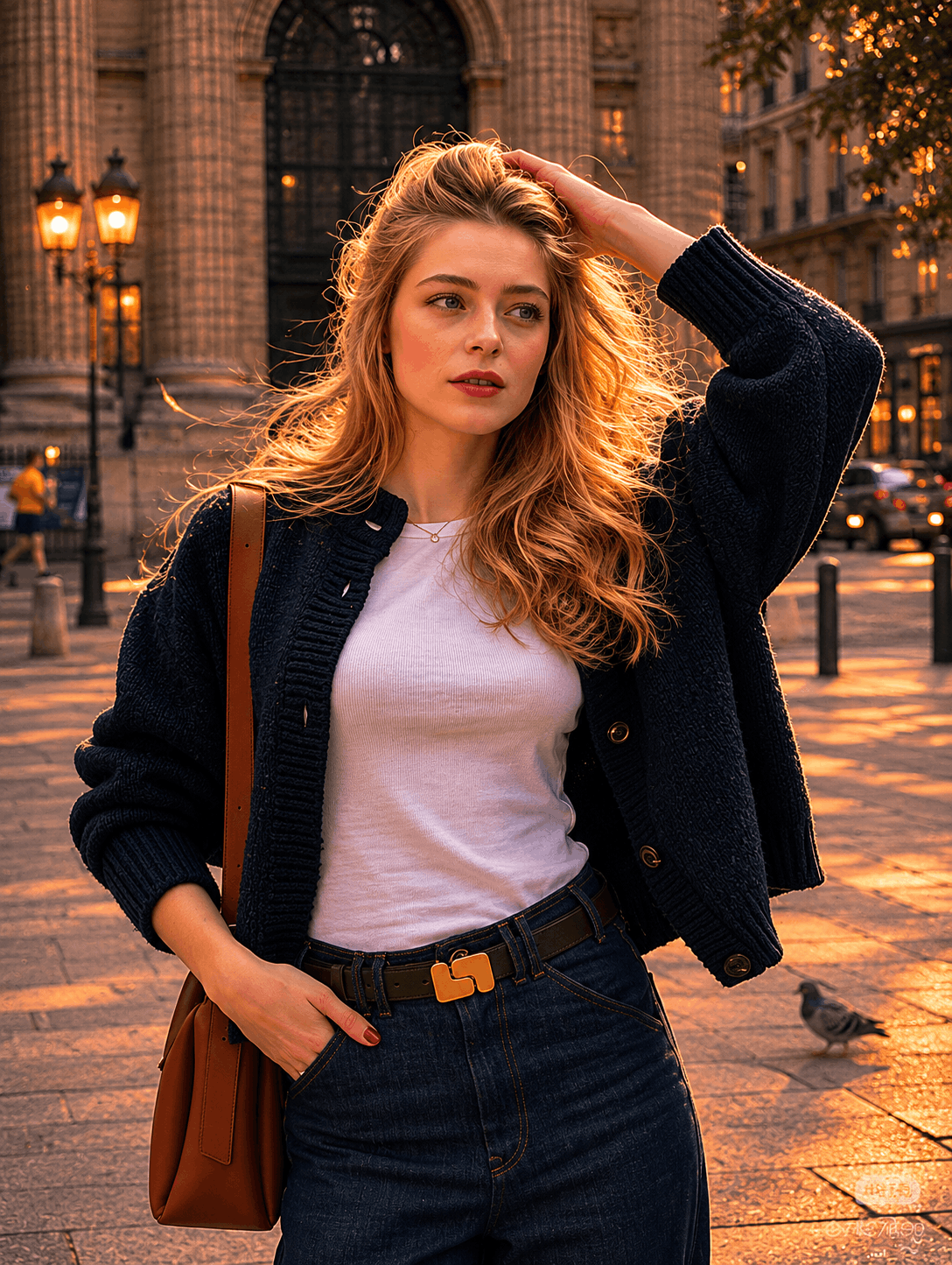
Upload a portrait and recreate the moody dusk glow of the Lofi Dusk Filter while keeping the same person, pose, and overall composition.

Create your Lofi Dusk Filter image

Upload a photo, add a prompt, and generate the Lofi Dusk Filter look.

0 Free Credits
Describe the lighting and mood of the Lofi Dusk Filter, not a new person or a new pose.
Quick prompts
Result
Preview the Lofi Dusk Filter look before you generate.
Example result
Lofi Dusk filter style preview portrait
Example result

A moody portrait with stronger edge light, darker surroundings, and a soft dusk glow.

Prompt presets

Lofi Dusk Prompt Presets

Pick a ready-made mood, send it straight to the generator, or copy it for later refinement.

#01

Instagram Viral Flash

Transform this portrait into a viral Instagram lofi dusk aesthetic with strong front flash, glowing rim light, soft blue-hour background, cinematic grain, nostalgic CCD camera texture, dreamy emotional mood, realistic skin, shallow depth of field.

#02

Tokyo Neon Dusk

Create a cinematic Tokyo street lofi dusk portrait with rainy neon reflections, purple-blue dusk tones, glowing shop signs, wet pavement reflections, soft haze, Y2K digital camera aesthetic.

#03

Rooftop Sunset

Turn this image into a rooftop golden-hour-to-dusk cinematic portrait, warm sunset edge light, soft flash photography, muted city skyline, nostalgic indie movie mood, film grain.

#04

Moody Rain Night

Create a rainy-night lofi dusk atmosphere with wet streets, reflective lights, soft fog, cinematic shadows, emotional storytelling vibe, realistic DSLR flash.

#05

Vintage CCD Camera

Make this look like an early 2000s CCD camera photo shot at dusk, soft overexposed flash, grainy texture, faded colors, nostalgic youth photography.

#06

Blue Hour Editorial

Transform this into a cinematic fashion editorial during blue hour, soft flash lighting, dark moody background, realistic skin texture, luxury magazine photography style.

#07

Indie Movie Scene

Create an emotional indie-film frame at dusk with soft haze, muted warm-orange and purple tones, cinematic grain, realistic lighting.

#08

Lo-fi Couple Portrait

Turn this into a romantic lofi dusk couple portrait with dreamy city lights, soft bloom, emotional cinematic atmosphere, realistic flash photography.

#09

VHS Analog Mood

Add VHS texture, analog distortion, faded dusk lighting, soft blur, nostalgic emotional atmosphere, old camcorder aesthetic.

#10

Korean Street Mood

Create a Korean street photography vibe at dusk, cinematic flash portrait, convenience-store lighting, emotional lonely atmosphere, realistic textures.

#11

Anime-Inspired Realism

Create a semi-realistic anime-inspired lofi dusk portrait with dreamy lighting, cinematic dusk sky, emotional mood, film grain, soft shadows.

#12

Dark Editorial

Transform this into a luxury dark editorial portrait with black background fade, glowing edge light, high contrast cinematic mood, subtle grain.

#13

Cozy Cafe Dusk

Create a cozy cafe dusk aesthetic with tungsten lights, warm reflections, rainy window mood, nostalgic lo-fi atmosphere.

#14

Soft Peach Skin

Add warm peach-toned skin highlights, realistic flash lighting, dreamy dusk shadows, atmospheric haze, cinematic portrait depth.

#15

Cyberpunk Lofi

Create a cyberpunk lofi dusk portrait with neon purple glow, reflective rain textures, moody cinematic atmosphere, realistic skin and lighting.

#16

Disposable Camera Style

Make this look like a disposable camera portrait from 2003, dusk lighting, harsh flash, soft blur, nostalgic grain.

#17

Lonely Urban Mood

Transform this image into a lonely urban cinematic dusk scene with empty streets, muted city lights, emotional storytelling vibe.

#18

Sunset Beach Lofi

Create a soft sunset beach lofi aesthetic with dreamy haze, film grain, pastel dusk sky, emotional cinematic atmosphere.

#19

Soft Bloom Portrait

Add subtle bloom diffusion, halation glow, dreamy dusk lighting, realistic facial details, atmospheric cinematic photography.

#20

Ultra Cinematic 8K

Transform this into an ultra-realistic cinematic lofi dusk portrait with glowing rim light, DSLR flash, soft fog, shallow depth of field, emotional luxury editorial style, photorealistic 8K.

How it works

How to Use the Lofi Dusk Filter

Most people discover the Lofi Dusk Filter through Instagram Stories, but the same visual result can also be recreated through AI image editing when Restyle or the exact filter is unavailable.

Step 1

Start with a clear portrait for the Lofi Dusk Filter

Choose a photo where the subject is easy to separate from the background. The Lofi Dusk look depends on visible edges around the hair, shoulders, and body so the backlight can create a stronger rim glow instead of disappearing into the scene.

Step 2

Describe the Lofi Dusk Filter lighting you want

Whether you use Instagram Restyle or an AI image tool, the key is to describe the lighting mood clearly: dark cinematic background, bright backlight behind the subject, soft front flash, peachy skin tones, subtle bloom, and realistic grain or halation.

Step 3

Refine the Lofi Dusk Filter glow until it feels natural

The best Lofi Dusk images do not look like fantasy neon art. They feel like night photography with stronger atmosphere. If the first result looks too artificial, ask for softer contrast, a more natural body glow, or a cleaner low-light portrait finish.

What it is

What the Lofi Dusk Filter Actually Means

The phrase Lofi Dusk Filter does not describe one simple brightness preset. It describes a whole visual mood that sits between evening portrait photography and AI-enhanced editorial lighting. Across the sources collected for this project, the effect is repeatedly described as a darker cinematic style with stronger edges around the subject, a more emotional low-light atmosphere, and a soft glow that makes an ordinary image feel more deliberate, dramatic, and shareable.

A Lofi Dusk Filter background with a brighter subject edge

One of the clearest recurring traits is separation. The background becomes deeper, softer, and darker, while the person or subject gains a brighter outline around the hair, shoulders, and clothing edges. This is why so many articles describe the look with terms such as rim light, glowing silhouette, or backlit portrait aesthetic.

Lofi Dusk Filter glow without losing realism

The glow is important, but it is not supposed to feel like a fantasy effect or heavy neon overlay. The best Lofi Dusk images preserve realistic skin texture, believable shadow falloff, and natural body proportions. The mood is dreamy, but the image still reads as a photograph rather than a fully synthetic illustration.

A Lofi Dusk Filter evening mood rather than a flat filter

Many descriptions compare the style to dusk, sunset, or early night lighting instead of standard color grading. That distinction matters because the effect changes how the scene feels, not just how it is tinted. Shadows become more atmospheric, contrast becomes more intentional, and the subject looks like it belongs inside a cinematic low-light environment.

A Lofi Dusk Filter blend of flash, bloom, and low-light texture

Another repeated pattern is the combination of direct flash style lighting with soft bloom, slight haze, or halation. This creates the impression of night photography captured with a consumer camera, an older digital look, or a lightly stylized editorial portrait. In practical prompt writing, this is often where grain, soft flash, and gentle highlight bleed become useful.

Why it spread

Why the Lofi Dusk Filter Took Off Across Instagram Stories and Reels

The Lofi Dusk Filter trend grew because it solves a common social problem: ordinary portraits often feel flat, but users still want a result that looks personal rather than over-produced. This effect sits in a sweet spot between effortless and dramatic. It gives selfies, portraits, and casual photos a cinematic mood that feels emotionally charged, but it still remains familiar enough to look like a believable version of the original person.

Why the Lofi Dusk Filter makes simple portraits look more intentional

A normal phone image can feel casual, but the Lofi Dusk look adds contrast, atmosphere, and depth. The result often looks closer to an editorial or creator-style image, which is exactly why so many people use it for Stories, profile updates, Reels covers, and aesthetic social posts.

Why the Lofi Dusk Filter is dramatic without being difficult to understand

Users do not need a deep photography vocabulary to respond to this trend. Even if they do not know terms like halation or edge light, they can immediately tell the subject looks more cinematic. The visual payoff is fast and obvious, which makes it ideal for short-form social media behavior.

How the Lofi Dusk Filter matches the current demand for mood-based visuals

A lot of current visual trends lean toward emotional lighting, darker backgrounds, nostalgic texture, and polished but imperfect realism. Lofi Dusk fits directly inside that larger preference. It feels aesthetic, but not sterile; stylized, but not cartoonish; dramatic, but still usable for everyday portraits and creator content.

Why people keep searching for the Lofi Dusk Filter

Multiple sources say users cannot always find the feature through Restyle, browse effects, or phased rollouts. That is one reason the keyword keeps expanding into tutorial content and AI prompt guides. People are not only curious about the style - they also want a reliable way to reproduce it when the native Instagram option is missing.

Prompt strategy

How to Brief AI for a More Convincing Lofi Dusk Filter Result

If you want AI to reproduce this trend well, the prompt should not just say "make it cinematic." That phrase is too broad. A better approach is to describe the exact lighting behavior, the desired amount of realism, and what should remain consistent from the original photo. The strongest prompts for this look usually combine structural preservation with a very specific lighting rewrite.

Name the Lofi Dusk Filter lighting behavior, not only the vibe

Prompting works better when you specify what the light should do. Ask for a bright backlight behind the subject, a white rim glow around the silhouette, a dark muted background, and a subtle front flash. These details are more actionable than broad words like aesthetic, trendy, or cool.

Tell AI what the Lofi Dusk Filter should keep unchanged

When you work from a portrait or selfie, it helps to tell the model to preserve the same person, face, hairstyle, skin tone, outfit, pose, and body proportions. That keeps the edit closer to the source and prevents the result from drifting into a different identity or an unrelated fantasy image.

Use Lofi Dusk Filter realism anchors to control the mood

The trend looks better when the prompt includes realism anchors such as realistic skin texture, natural atmospheric glow, authentic low-light ambience, and subtle grain. These phrases reduce the risk of turning the image into exaggerated digital art and help the result stay closer to flash photography or a polished social portrait.

Revise one Lofi Dusk Filter visual variable at a time

If your first image is close but not perfect, do not rewrite the entire prompt. Change one variable: softer bloom, darker background, less haze, stronger rim light, or warmer skin tones. This makes it easier to understand which adjustment actually improves the Lofi Dusk feel and which one weakens it.

Best use cases

Where the Lofi Dusk Filter Look Works Best

Even though the trend started around Instagram-style portraits, the same lighting language can work in several practical situations. The effect is especially useful when you want more emotional impact from an image without turning it into a completely different artistic genre. It adds atmosphere, subject separation, and social polish while keeping the image readable and human.

Lofi Dusk Filter portraits, selfies, and profile images

This is the most obvious fit. A Lofi Dusk style edit can make a standard portrait feel more cinematic, memorable, and personal. It works especially well for creators, students, influencers, or anyone who wants a moody profile image that still looks like a real photograph.

Lofi Dusk Filter fashion and street-style edits

Because the style emphasizes silhouette edges and contrast, it works well for outfit photos, street portraits, and simple editorial fashion scenes. The glow helps separate the model from the background while the darker color treatment makes the overall frame feel more premium and intentional.

Lofi Dusk Filter Reels covers, story visuals, and social thumbnails

Short-form content needs images that stop the scroll quickly. Lofi Dusk style lighting gives you an immediate visual hook: bright edges, dark background, and a dramatic mood that reads well even at smaller sizes. That makes it useful for Story covers, post thumbnails, and creator promo graphics.

Lofi Dusk Filter prompt study and style transfer practice

This trend is also a good learning case for prompt writers because it is specific enough to break down into parts: background darkness, body glow, flash lighting, grain, dusk color mood, and realism control. If you can recreate this look well, you usually improve at writing clearer image editing prompts in general.

Lofi Dusk Filter FAQ

What is the Lofi Dusk Filter?

Lofi Dusk Filter is a portrait editing style that makes a photo look darker, moodier, and more cinematic. The most common traits are a dim or near-black background, a bright rim light around the subject, soft body glow, dusk-like contrast, and subtle low-light texture. On Instagram, people often associate it with Restyle or effect-browser based edits, but the same visual style can also be recreated with AI image prompts.

Why is the Lofi Dusk Filter trending on Instagram?

It is trending because it upgrades ordinary selfies and portraits into something that feels more polished without looking completely fake. The result is dramatic enough to stand out in Stories and Reels, but still familiar enough to feel personal. That balance between realism and cinematic mood is a big reason the effect spread so quickly across creator content.

How do I use the Lofi Dusk Filter in Instagram Stories?

Most published guides describe a similar workflow: open Instagram Stories, upload a photo, tap the Restyle icon if it is available, and look for Lofi Dusk among the generated effects. Some articles also mention using the effect browser and searching for the name directly. Because feature rollouts vary by account and region, not everyone sees exactly the same menu path at the same time.

What if I cannot find the Lofi Dusk Filter inside Instagram?

That is one of the main reasons people search for the term online. Many users report that Restyle is missing, the effect does not appear, or the app shows an error while processing. In those cases, the most practical alternative is to recreate the look with an AI image editor by uploading a portrait and prompting for backlight, rim glow, dark background, bloom, flash lighting, and dusk mood.

What makes a Lofi Dusk Filter prompt feel closer to the real look?

The most reliable prompts describe both the mood and the lighting mechanics. A good prompt usually mentions a dark or muted background, a strong white backlight behind the subject, glow around the hair and shoulders, subtle front flash, warm or peachy skin tones, realistic low-light ambience, and soft grain or halation. Those details are much more useful than simply saying "make it aesthetic."

Does the Lofi Dusk Filter work only for selfies?

No. Selfies and portraits are the most common use cases, but the same style can also work on half-body shots, fashion portraits, nighttime street photos, and creator cover images. The key requirement is that the subject should be clear enough for AI or Instagram to separate it from the background so the rim light and glow can read properly.

What visual details define a convincing Lofi Dusk Filter image?

Across the sources collected for this page, the same details appear again and again: dark cinematic mood, stronger contrast, dusk-toned color treatment, white or soft glow around the body, backlit portrait edges, slight bloom, and low-light grain. The best images preserve realism while changing the emotional feel of the photo. If the result looks like neon fantasy art, it usually has gone too far away from the trend.

Can I use AI to recreate the Lofi Dusk Filter if Instagram fails?

Yes. In fact, many tutorials now present AI as the fallback solution when Instagram access is inconsistent. Upload a portrait, explain what must stay the same, and ask for a Lofi Dusk style transformation with dark mood, rim light, soft flash, bloom, and realistic dusk ambience. This often gives you more control than the built-in effect because you can refine the exact amount of glow, darkness, and texture.